

Basic Maintenance needed offers an app couldn't run. We built them without Shopify Plus.
Basic Maintenance is a founder-led skin and hair care brand from Toronto. We've been its main development team since its early days in 2022, and it's a seven-figure brand now. In 2026 it wanted two new ways to save on its product pages. The offers app we tried first couldn't follow its rules, and the custom route usually needs Shopify Plus. This is what we built on the plan it has, and how we work.
Live since March 2026
No new SKUs · Shopify, not Plus
70
Days from request to live
Including a proof of concept and a change of plan
4.5
Years as their dev team
From theme work to their new site
20
Product pages with an offer
12 with multi-packs and 8 with add-ons, checked October 7, 2026
Client
Industry
Skin and hair care, direct to consumer
Platform
Shopify (not Plus)
The client
Basic Maintenance makes skin and hair care in Toronto and sells it from its own Shopify store, in Canadian and US dollars. Co-founder Andrew Lucas runs it hands-on: he writes his own copy, edits his own landing pages and runs a sale every month.
The catalog mixes single products, systems, kits and subscriptions. We've been the main development team behind the store since February 2022, on the theme it still runs today, with more than 800 commits in one code repository since.
Two ways to save, with house rules
In early 2026 Andrew asked for what he called a "2 Ways To Save" section on his product pages: buy more of one product for less, or save by buying it as part of a system. Within ten days the second idea became add-ons for his two-step systems. By the time we'd planned it, the offers had rules to follow.
The ask, and the rules
Multi-packs on single products: 2 at 20% off, 3 with one free
Add-ons on two-step systems, up to two per system
An on and off switch for the monthly sales
No offer discounts on subscriptions
No quantity deals on the 60 mL size of products sold in two sizes
Order-level discount codes still work on top
No new SKUs
That last rule mattered. Extra bundle SKUs make a mess of inventory and picking, and bundles had already complicated the customs paperwork on US orders.
The off-the-shelf offers app we tried first couldn't do this: it couldn't show two offers on one product or treat sizes differently. The custom route usually means Shopify Plus, because only Plus stores can run a custom app with Shopify Functions or override the price of a cart line.
How we work, step by step
Every step below happened on this project, and each one left a record: an email, a ticket, a call note or a commit.
Ask first
Before building, we asked the one question that changes the build: 3 of the same item, or any 3? It came with a recorded video walkthrough.
Prove it off the live store
We loaded their real products into our own development store and tested the app route there before touching theirs.
Say when it breaks
The app couldn't run two offers on one product or treat sizes differently. We said so in writing and changed the plan.
Decide in writing
A decision memo set out the option we recommended, the one we didn't, and what could stack. Andrew answered point by point, and the call notes became the spec.
Build behind a preview
Work happened on development themes, and every hand-off came with a preview link. Changes went live after Andrew's OK.
Check before you see it
Builds get reviewed before the client sees them. On this one, review asked for the add-on script to load later so pages stay fast, and for hidden cart details to stay hidden from shoppers. Both were fixed the next day, before it went to Andrew.
Release in stages
Multi-packs went live first and add-ons about an hour later. On the setup call, Andrew got one rule for the multi-pack discount settings: change the titles, nothing else.
When the plan broke
The first plan we tested was an off-the-shelf offers app, picked to keep the build inside the estimate. We tried it on our development store with Basic Maintenance's real products, then set it up on their store while the rules took shape, and it hit two walls.
What we tried
What happened
Two offers on one product page, both through the offers app
It allows one offer per product. Its own support team confirmed it couldn't run both.
Different rules for different sizes, inside the app
It couldn't treat sizes differently, even with custom code, so a product's 60 mL size would have had the same quantity deals as its full size.
Treating the add-ons as a bundle
That was our misread. They were a product-options problem, and we said so.
Carrying on with the app
We kept billing only the hours used, explained in writing why a custom build would cost more than first estimated, and wrote a decision memo before building more.
Request to live in 70 days
Jan 7
Day 0
The request
Multi-packs that pull the right stock and look better on the page, plus a question about bundles, by email.
Jan 22
Day 15
First plan
A first approach, and the question that changes the build.
Jan 27 to Feb 3
Days 20 to 27
Proof of concept
The app route, tested on our development store with their real products.
Feb 2 to 3
Days 26 to 27
First wall
Andrew asks for both offers on one page. The app allows one per product, and we tell him so in writing the next day.
Feb 11
Day 35
Second wall
No rules per size, even with custom code. The add-ons reframed as a product-options problem.
Feb 22 to 25
Days 46 to 49
Decision
The decision memo, Andrew's answers, and a call that turned them into the spec.
Mar 18
Day 70
Both offers live
Stock Up & Save first, Add & Save about an hour later.
Mar 19
Day 71
Follow-ups
Next-day changes went live: an option to set the both-products discount to a fixed percentage, and add-ons switched off when a shopper picks Subscribe and Save.
What we built
Two blocks built into the theme, multi-packs on single-product pages and add-ons on system and kit pages, and the rules underneath them.
Stock Up & Save
On single products: one pack, two packs at 20% off, or three with one free. A 3 pack is three of the same item in the cart, so stock and picking don't change.
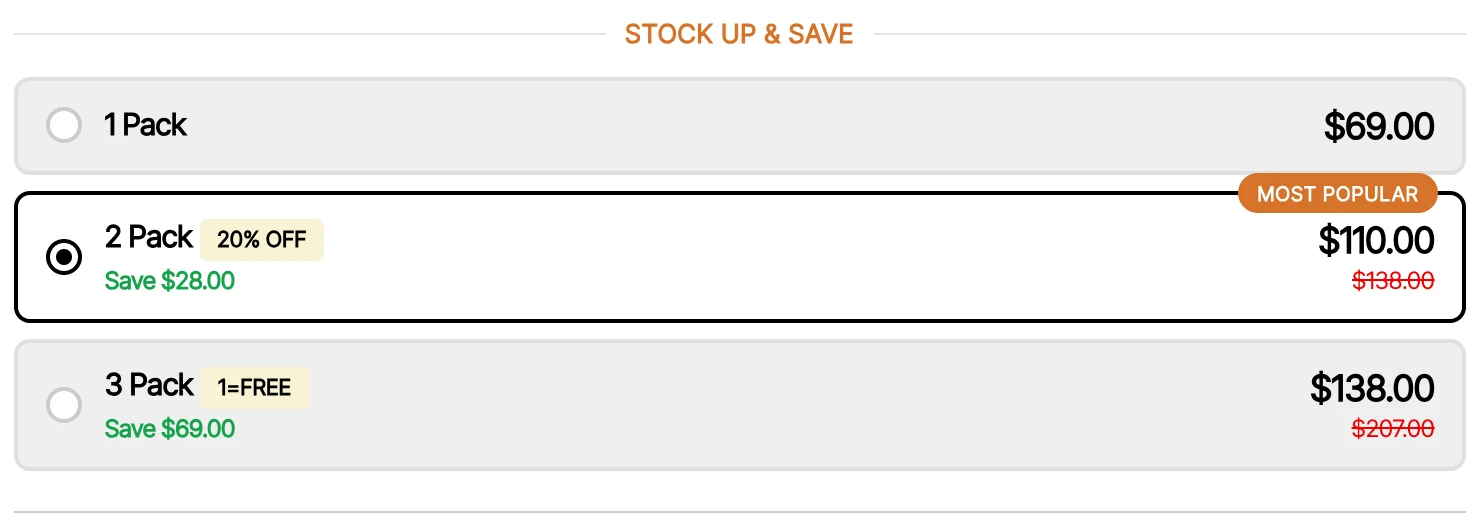
Add & Save
On systems and kits: add one product at an extra 15% off, or both at an extra 20%. Add-ons stay tied to the system they came with, so removing the system removes them too, and the sticky add-to-cart button follows the choice.
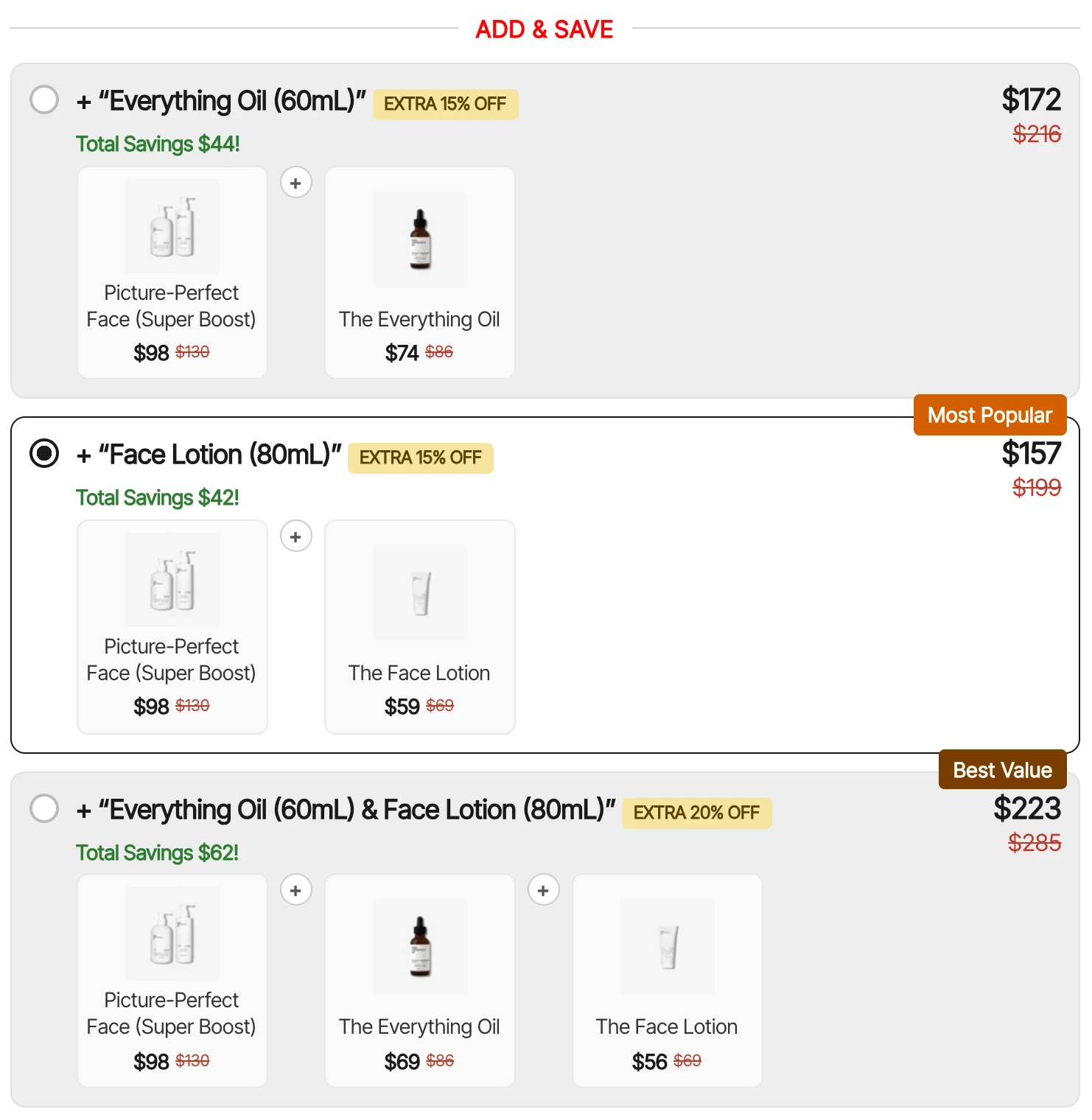
Captured October 7, 2026, on The Face Lotion and Picture-Perfect Face (Super Boost) product pages, with prices in Canadian dollars.
Both blocks sell SKUs already in the catalog. No new bundle SKUs, no hidden placeholder products.
The rules are built in: no offer discounts on subscriptions, and order-level codes still combine.
Andrew runs it from the Shopify admin: which add-ons show on each system, their discounts, and store-wide settings to switch each offer off for sale weeks.
Two apps came out: a frequently-bought-together app the store had run since 2023, and the stopgap offers app from the first plan.
Where Plus would usually come in
Overriding the price of a cart line, or running your own custom app with Shopify Functions, is Plus-only. So the shopper-facing part lives in the theme, and the discounts are applied in the cart and at checkout by Dollarlabs, a public App Store discount app built on Shopify Functions, set up variant by variant. Public App Store apps can use Shopify Functions on any plan, apart from a few features Shopify keeps for Plus.
Who built what
Prospects often ask which parts an agency built and which came from apps. Here it is.
Part of the store
Who
Notes
Theme
Atlantic theme (Pixel Union), customized by FireNet since 2022
Maintained and extended by us. The first setup came from another studio.
Product page sections
FireNet
Driven by Shopify's custom data fields, so content changes don't need a developer.
Stock Up & Save and Add & Save
FireNet
Built into the theme by Michael Omisol and reviewed by Justin Schellenberg.
Discounts in the cart and at checkout
Dollarlabs (app)
Set up by us with Andrew, variant by variant.
Bundles and kits
Simple Bundles & Kits (app)
Added by Andrew to split kits into their parts.
Subscriptions
PayWhirl (app)
Kept out of the offers by rule.
Landing pages
Replo (app)
Andrew edits desktop; we handle mobile and check orders go through.
Where it landed
Both offers have been live since March 2026 on Basic Maintenance's single-product, system and kit pages, running on the theme we've looked after since 2022.
Live since March 18, 2026. Product pages checked October 7, 2026.
2
Offers live, on the plan they have
20
Product pages with an offer
70
Days from request to live
What a normal month looks like
Most weeks are smaller than this build. This is how a request moves from Andrew's inbox to the live store.
Request, by email or a shared Slack channel
Video walkthrough and a written summary
A ticket with a pass and fail test
Preview link
Andrew's OK
Live
One monthly invoice for the hours worked
Same-day changes happen. One request came in at 10:19 a.m. Toronto time, was on a preview link by 12:09 p.m., and Andrew approved it for the live store at 2:21 p.m. It was live by 2:55 p.m.
We look past the ticket. When a price wouldn't update and Shopify Support said the theme was to blame, Justin installed Shopify's unmodified stock theme to prove it wasn't and took that to Support in a live chat. Support then found a fixed price set in Shopify Markets and removed it the same day.
We flag trouble early. A heads-up when Shopify had a checkout shipping-rate issue, and a quick check when a suspicious email lands.
Our own records, February 2022 to October 2026
800+
Commits in one code repository
48+
Recorded video walkthroughs
70+
Tracked tickets
11
Homepage QA findings fixed before it went to Andrew
"Of the many shopify partners I've worked with - Firenet remains one of one. There isn't a problem they can't solve in a timely, clear and cost effective way."Andrew Lucas, co-founder of Basic Maintenance, wrote this in a 5-star Shopify Partner Directory review on March 9, 2026, before these offers launched. He's also advised us on marketing, sometimes in trade for development work.
What's next
Basic Maintenance is getting a new site, with visual design by Carley Dupuis from Andrew's own brief and wireframes. New pages are built on unpublished themes, and a separate staging store holds a copy of the live store's products and data, so shoppers see no change from the rebuild until launch.
The new site, step by step
Jul 2026
Brief and plan
Andrew's brief broken into phases and estimated bottom-up, then checked for both padding and gaps.
Jul to Oct
A store of its own
A separate staging store with a copy of the live store's products and data, so product data can change without touching the live store.
Aug to early Oct
Build and QA
New homepage and product page built against the design, each through numbered QA.
Now
Client review
Homepage and product page with Andrew for review.
Is this you?
Talk to us if
Your offers live in apps that fight each other, or can't treat sizes differently.
Someone told you multi-pack or add-on pricing needs Shopify Plus.
You sell single products, sets and subscriptions, and run regular sales.
You want a developer who tells you when a plan won't work, before you've paid for all of it.
We're not the fit if
You want a guaranteed sales lift. We don't promise one, and be wary of anyone who does.
One app already does everything you need.
Not on Plus?
Switchboard, a checkout rules app from The Click Collective, fills the gaps non-Plus stores run into. You set up quantity breaks and buy X get Y from your admin, and offer blocks built into your theme can tell it which discount to apply. Its discount rules run on every plan, and there's a free plan to start.
A Click Collective app, built by FireNet's lead dev.
On Shopify Plus?
On Plus, the same rules can run as your own discount function inside a custom app. We also build custom apps with Shopify Functions for Plus stores, for checkout rules, delivery options and payment options, with a staging version to test on before anything goes live.
Sources
The platform facts on this page come from Shopify's own documentation, checked in October 2026. Project dates come from our emails, tickets and commit history.
Custom apps with Shopify Functions are Plus-only.
Only stores on a Shopify Plus plan can use custom apps that contain Shopify Function APIs. Stores on any plan can use public App Store apps that contain functions.
Source: Shopify (n.d.). About Shopify Functions, Shopify developer docs.
Overriding cart line prices is Plus-only.
Only development stores or stores on a Shopify Plus plan can use apps with cart line update operations, which override a cart line's price, title or image.
Source: Shopify (n.d.). Cart Transform Function API, Shopify developer docs.
The review.
Basic Maintenance rated FireNet 5 out of 5 for quality of work and for communication, March 9, 2026.
Source: Shopify (2026). FireNet Designs Inc., reviews, Shopify Partner Directory.
Work with us
Offers stuck in apps that fight each other? Told you need Plus?
On a free call we'll look at your store and tell you straight what's possible on the plan you have.
You'll talk to a developer, not a sales rep.

Ready To Take Your Shopify
Store To The Next Level?
Real solutions. No guesswork. Just results.